Skins & Avatars Clothes Maker
- 3.9
- Rating
- 5.00M
- Installs
- Free
- Price
 Analysis by App-foxy
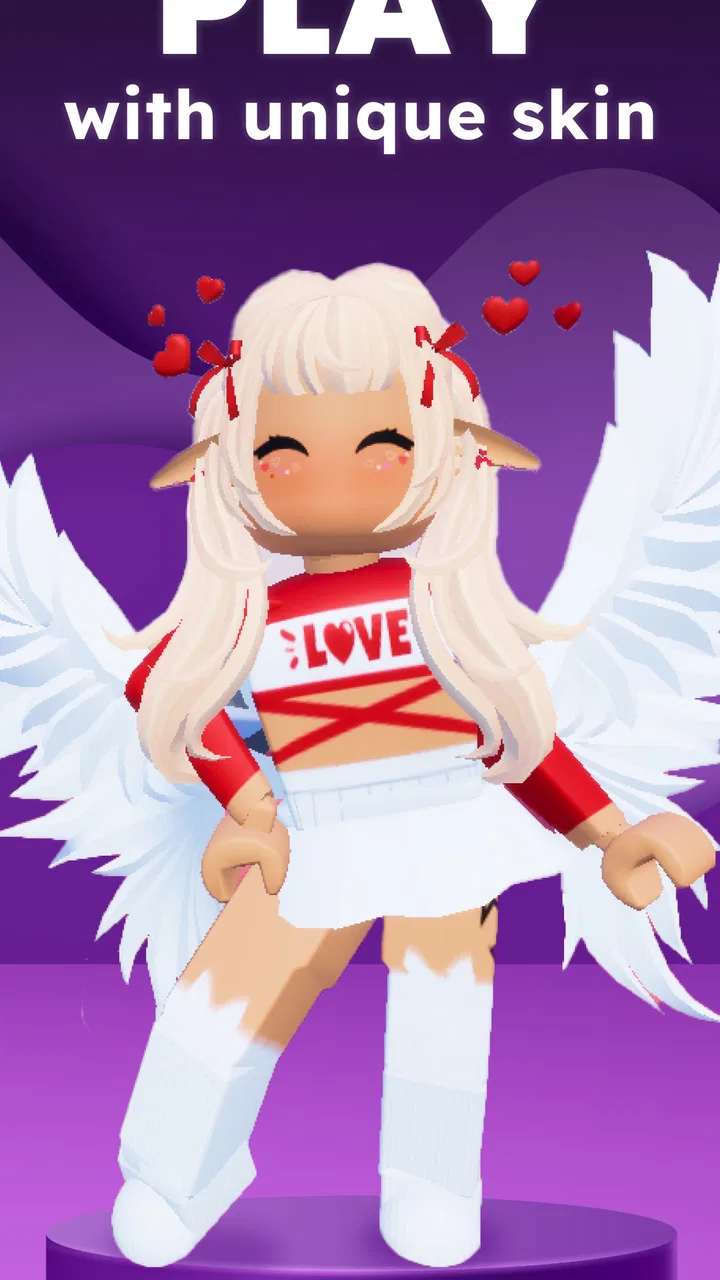
I opened Skins & Avatars Clothes Maker with a simple goal: make a character that looked personal enough to use as a profile image, while keeping the process easier than building an outfit from scratch in a full drawing app. That is the right way to approach this free tools app from Pixelvoid Games Ltd. It is not trying to replace a professional editor. Instead, it gives boys and girls a focused place to work on an avatar, experiment with clothes, and arrive at a character that feels more deliberate than a default image.
The first impression is shaped by the app’s narrow purpose. You are not opening a general photo editor, a social network, or a game with a large world to explore. You are opening a character-making workspace built around skins, outfits, pants, shirts, and visual combinations. That focus is useful when I already know what I want: a new character for a chat profile, a playful identity for a community, or a quick visual concept before drawing something more elaborate elsewhere.
It is also worth setting expectations early. The app is free to install and suitable for Everyone, but it includes in-app purchases ranging from $3.99 to $39.99 per item. Its store summary makes the clothing and avatar angle clear, while the short description reduces the idea to “Skins Maker.” In practice, I would treat it as a convenient creative starting point rather than an unlimited wardrobe or a complete character-design studio.
You May Also Like

 Blood Strike: 2.5 Anniversary
Blood Strike’s Loadouts Turn Every Drop Into a Tactical Gamble
A close look at Blood Strike’s custom loadouts: how fast access to signature weapons reshapes its battle royale rhythm, rewards preparation, and narrows the gap between fights.

 Pandora - Music & Podcasts
Pandora’s Music Is Easy to Start, but Harder to Recover
Pandora’s strength is its low-effort path from a seed to a station. Its weak spot is how much confidence it asks you to place in connection, setup, and quiet recovery.

 8 Ball Pool
 Is Built on Rivalries, Rematches, and Routine
A close look at the rivalries, rematches, shared routines, and unanswered safety questions that turn a quick pool match into a persistent mobile community.

 Samsung Music
’s Quiet Strength Is Playing What You Already Own
Its reach comes less from spectacle than from dependable access to a personal library. That simplicity is both the app’s strongest retention engine and its ceiling.

 AccuWeather: Weather Radar
AccuWeather Review: A Quick, Clear Forecast for Everyday Decisions
For everyday plans, the best forecast is the one you can understand quickly. AccuWeather makes rain timing, radar, and local conditions easy to act on, with a few trade-offs.

 Hill Climb Racing
Why Hill Climb Racing Still Turns Crashes Into One More Run
A tiny car, a bumpy hill and one more upgrade: Hill Climb Racing keeps resurfacing because its simple chaos makes every near-miss feel personal.
More From Our News Desk



From a blank idea to a finished avatar
I start with a small, specific idea rather than trying to design everything at once: a character’s mood, a main clothing color, or the place the avatar will be used. That keeps the choices purposeful and makes it easier to tell when the look is finished. From there, I’ll consider how to keep the creative process comfortable when the device is shared.
Starting with the character you actually need
The most useful starting condition is a small, concrete brief. “Make something cool” is too vague and can lead to endless switching between visual choices. I get better results when I begin with three decisions: who the character is, what mood the outfit should communicate, and where the finished image will be used. A cheerful character for a child’s profile needs a different approach from a darker gaming identity or a simple mascot for a group chat.
That planning matters because clothing choices can become the whole task. If I begin by tapping through every possible option, I spend more time browsing than designing. If I decide on a color family and a personality first, the editor becomes a way to test an idea instead of a stream of disconnected selections. This is one of the app’s quiet strengths: its limited subject matter encourages a direct visual decision rather than pulling me into unrelated editing tools.
I would also decide whether the avatar needs to be recognizable at a small size. A detailed outfit may look interesting while editing but lose its identity when reduced to a tiny profile picture. Strong contrast between the character and the clothing usually helps more than adding many competing details. For a larger image, I can afford to make the shirt, pants, and overall silhouette more expressive.
Building the look one choice at a time
The central workflow is straightforward: shape the character’s appearance, work through the clothing choices, and keep checking whether the pieces belong together. The store description specifically points to outfits, pants, and shirts, so those are the decisions I would prioritize rather than treating every item as equally important. A shirt can establish the main color and mood, while pants can either support that choice or create a deliberate contrast.
My preferred method is to pick one anchor item first. If the shirt has a strong color or recognizable style, I use it as the visual foundation. Then I choose pants that either balance it or intentionally push the character in another direction. This prevents a common problem with avatar editors: selecting attractive pieces individually that look awkward when combined. A good outfit is not simply a collection of good items; it is a readable combination.
After that, I pause before making more changes. I look at the character as a whole and ask whether the outfit says anything consistent. Does it look casual, playful, sporty, formal, or mysterious? If the answer is unclear, I simplify rather than add. In a tool aimed at quick character creation, restraint is often more effective than trying to show every available option at once.
A second practical tip is to make variations instead of endlessly editing one version. I might create a bright outfit, a darker alternative, and a balanced middle option. Comparing three clear directions is easier than trying to remember whether the previous shirt looked better with the earlier pair of pants. This workflow is especially useful for parents helping a child choose an avatar, because it turns the process into a small creative exercise instead of an open-ended search.
Using the app as a handoff point
The finished avatar may not be the final destination. In my experience, the most realistic use is as the first stage of a larger personal workflow. I create the character here, decide which version communicates the right personality, and then use that result wherever an avatar or skin is appropriate. The app is valuable because it concentrates the visual decisions in one place before I move on to another service or creative tool.
That handoff changes how I judge the editor. I do not need it to behave like a full illustration package if my next step is simply choosing a profile image. Conversely, if I expect to add custom lettering, draw new accessories, retouch edges, or prepare a carefully composed poster, I would rather use a dedicated image editor after creating the base character. The avatar maker can provide the starting subject, but it should not be mistaken for the entire production pipeline.
There is also a useful handoff between people. A child can choose the character and clothing, while a parent can help decide whether the final image is suitable for a profile or shared space. A small group can agree on a visual theme by creating related avatars with different clothing combinations. The app’s focused format makes those conversations easier because everyone is looking at the same type of decision: character identity through appearance.
What the result feels like
The result is best when I want a quick, recognizable character rather than a technically complex image. A successful outcome has a clear focal point, clothing that does not fight for attention, and a personality that survives even when the avatar is viewed at a small size. That may sound simple, but it solves a common everyday problem: needing something more personal than a blank icon without spending an evening learning a complicated design program.
For example, imagine I am joining a hobby group and want an avatar that suggests my interest without using a photograph. I can start with a friendly character, choose a shirt that gives the strongest color cue, and use pants that keep the overall shape easy to read. I would then compare the result at the size where it will actually appear. If the outfit still looks distinct there, the workflow has done its job.
Another realistic scenario is preparing a small set of matching characters for friends. Rather than copying one design exactly, I would keep a shared visual idea while changing the clothing combinations. One person might use a brighter shirt, another a darker choice, and another a more neutral outfit. This creates a group identity without making every avatar identical. The app is particularly approachable for this kind of low-pressure collaboration because the creative brief stays understandable.
The app’s audience size also suggests that this is not an obscure experiment. It has passed five million installs, carries an average rating of 3.9 from around nineteen thousand ratings, and has about five hundred twenty written reviews. I read that combination as a sign of broad interest with room for mixed experiences. A rating below the very top range fits my own view: the concept is accessible and useful, but the value depends heavily on how much variety and control a particular user expects.
Where the flow breaks down
The first break comes when I want precision rather than selection. A focused avatar maker is convenient because it reduces complexity, but that same simplicity can become a limitation. If I need to draw a custom logo on a shirt, adjust tiny visual details, or create an unusual pose, I would move to a more flexible editor. This app makes the fastest path to a ready-made character, not necessarily the most original path.
The second break is decision fatigue. Even a small collection of clothing choices can become tiring when I do not have a clear concept. The solution is not to blame the editor; it is to work with a brief and limit the number of variations. I recommend deciding on the character’s mood before opening the wardrobe and stopping once two or three convincing candidates exist. That keeps the tool from turning a quick task into repetitive browsing.
Purchases are another point to consider. The app is free, but individual in-app items can cost from $3.99 to $39.99. I would avoid beginning with the assumption that every appealing option will be available at no cost. A better approach is to explore the free experience first, decide whether the basic workflow is already useful, and only then consider whether a paid item is worth it for a specific project. For families, that makes it sensible to agree on purchases before handing the device to a child.
The version I reviewed is 1.2.0, and the app runs on devices using Android 6.0 or later. That makes it accessible to a broad range of Android phones and tablets, although compatibility alone does not guarantee that every device will feel equally comfortable for visual editing. A smaller screen can make outfit comparison less convenient, so I would take extra care to review the final character at the size where it will be used rather than judging it only while zoomed in on the editing screen.
Who should use it, and who should skip it
I would recommend it to someone who wants a friendly, focused way to make a character without learning layers, brushes, masks, or complex export settings. It suits children, casual creators, parents looking for a simple activity, and anyone who needs a new avatar quickly. It is also a reasonable first step for a person who has an idea for a character but does not yet know how to draw it from nothing.
It is less suitable for an illustrator who wants complete control over every line, a creator building a detailed brand mascot, or anyone looking for a photo-based editor. It is also not the best choice if the main goal is animation, advanced retouching, or a highly specific character that cannot be represented through the available clothing and avatar choices. In those cases, a general drawing app or a more advanced character-design tool will provide a better long-term workspace.
My recommendation is therefore conditional but positive: use it when speed, approachability, and outfit experimentation matter more than deep customization. Start with a clear purpose, build around one strong clothing choice, compare a few variations, and judge the result at its real destination. That workflow avoids most of the app’s friction and makes its strengths easier to appreciate.
My final take after following the full workflow
Skins & Avatars Clothes Maker succeeds as a compact tool for turning a vague character idea into a usable visual identity. I like that the path is easy to understand: decide who the character is, assemble the look, compare alternatives, and hand the finished avatar to the place where it will be used. The app does not need to be a complete art studio to be useful.
Pixelvoid Games Ltd has positioned it in a practical middle ground. It is more focused than a general editor, but that focus means I have to accept less freedom than I would get from drawing everything myself. The free entry point is helpful, the Everyone age rating makes it approachable, and the clothing-centered workflow is clear. The purchase range means I would still review the available choices carefully before spending anything.
Ultimately, I would install it for quick avatar projects, outfit experiments, and simple character concepts. I would skip it for precision illustration or serious brand work. If you need a character today and want the process to feel manageable rather than technical, this app is worth trying. Its best result comes from treating it as a focused avatar workshop, not as a replacement for every creative tool on your phone.
FAQs for Skins & Avatars Clothes Maker
01What features does Skins & Avatars Clothes Maker offer?
Skins & Avatars Clothes Maker provides a robust platform for customizing your avatar's appearance. Users can choose from a wide range of clothing, accessories, and skin tones. The app also offers pre-made templates and a variety of design tools, enabling users to create unique looks with ease. It's designed to be user-friendly for both beginners and experienced designers.
02Is Skins & Avatars Clothes Maker free to use?
The app offers a free version with basic features and a selection of customization options. However, to access premium designs and tools, users may need to make in-app purchases or subscribe to a premium plan. This ensures a more extensive library of items and exclusive features for avid creators.
03Can I use Skins & Avatars Clothes Maker offline?
Skins & Avatars Clothes Maker requires an internet connection for initial download and accessing its full suite of features. While some basic features might be available offline, an active connection is recommended to access updates, new content, and community features such as sharing your creations.
04How user-friendly is the app for beginners?
The app is designed with an intuitive interface that guides users through the customization process step-by-step. It offers tutorials and tips for new users, making it accessible for beginners while still providing depth for more advanced users. The drag-and-drop functionality and easy navigation enhance the user experience.
05What platforms is Skins & Avatars Clothes Maker compatible with?
Skins & Avatars Clothes Maker is available on both Android and iOS platforms. Users can download the app via Google Play Store for Android devices and the Apple App Store for iOS devices. Ensure your device meets the app's system requirements for optimal performance and experience.
Pros
- Extensive library of avatar options.
- User-friendly interface for customization.
- Regular updates with new content.
- High-quality graphics and animations.
- Seamless integration with social media.
Cons
- Limited free options without purchase.
- Occasional lag on older devices.
- Some features require internet access.
- Ads can be intrusive at times.
- No offline mode available.

Skins & Avatars Clothes Maker
Gallery